X4 Pro Review
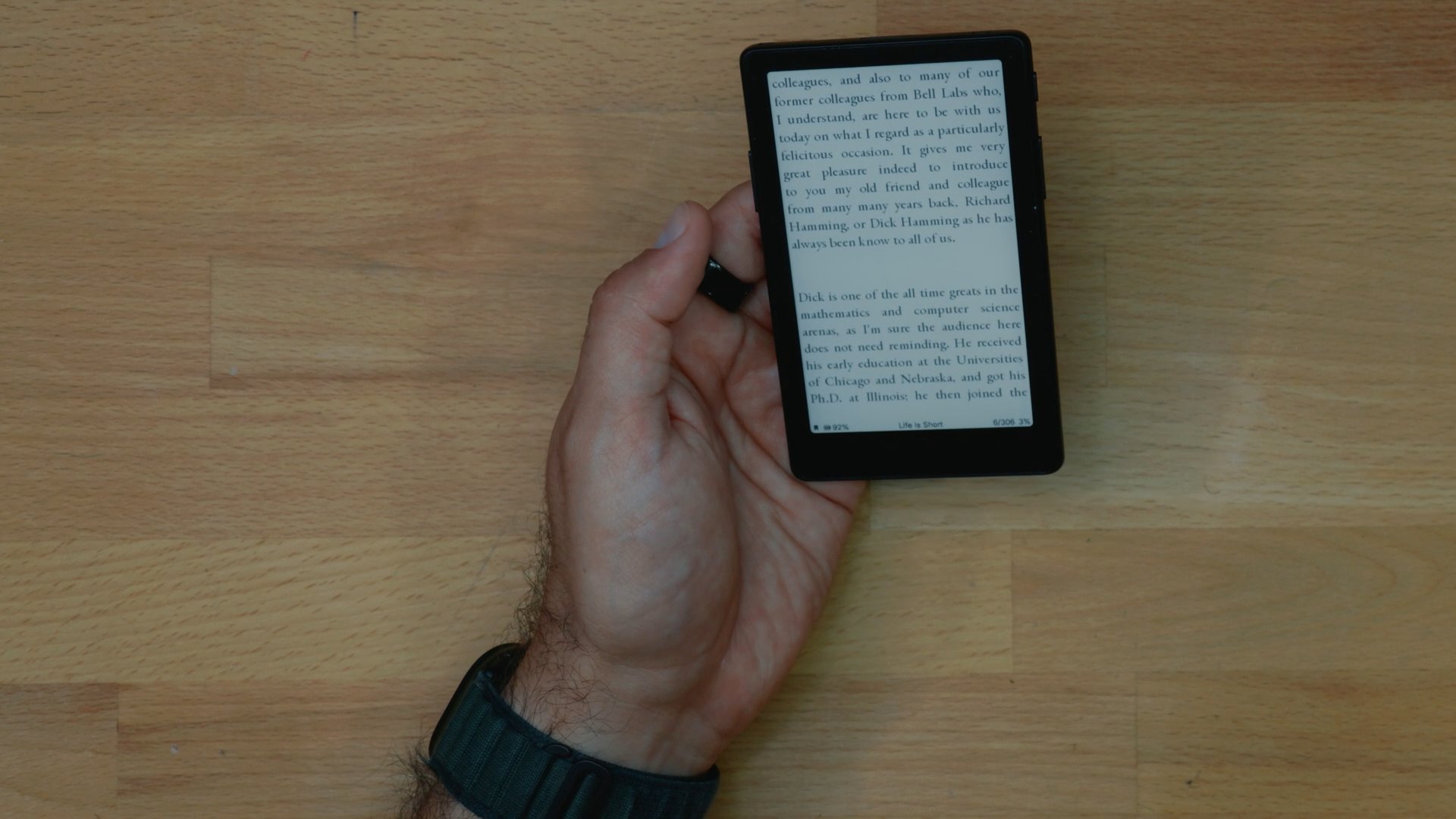
A pocket-size E Ink reader for articles and short reads when you're out and about.
Buy it if you're like me. I don't have a lot of strong will or motivation sometimes when I'm out and about to just be reading, but instead I just jump on social media or check email.
But I still want to read as much as possible. This product filled that gap, and I've started to read a lot more.
Skip it if a Kindle already goes where you go. I own a Kindle that is great for books, and I carry it often, but it does not fit in my pocket. So I'm often relying on my phone to fill that gap.
Check buying optionsPros
- It fits in the hand and doesn't take much space in a pocket.
- It's distraction-free, so I'm finally reading the articles I was neglecting.
- In the Xteink app you can change the font, and it converts files and optimizes them for the device.
- You can load it over Wi-Fi from your phone, with a microSD card, or by USB to a computer.
Cons
- I don't carry it loose with my phone because I'm afraid the screen will break or scratch, and I'm still looking for a firmer way to attach it to my notebook.
- I haven't tested PDF files.
- If you install sideloading software like CrossPoint, you give away some of the Xteink app's book conversion.
Video
Xteink X4 Pro in a Pocket Notebook: My Fix for Mindless Scrolling
Technical Details
| Display | 4.3-inch E Ink touchscreen |
|---|---|
| Pixel density | 219 ppi |
| Front light | Adjustable, dual-tone |
| Controls | Touch and physical page-turn buttons |
| Weight | 72 g (2.5 oz) |
| Thickness | 5.95 mm |
| Battery | 1100 mAh |
| Internal storage | 16 GB |
| Expandable storage | microSD up to 256 GB |
| Charging | Pogo-pin |
| Native formats | EPUB and TXT |
| Converted in the Xteink app | MOBI and PDF |
Buying Options
Discount codes
- Xteink X4 Pro: free magnetic case with code x4prokoc (add the case to your cart): get the deal
| Seller | Price | |
|---|---|---|
| Amazon | $99.00 | Buy |
| XTEINK | Check price | Buy |
Full Review
Getting files onto it
There are three ways to get files onto it. I typically join a network if I want to just do it through my phone.
If I want to transfer using the memory card, I can take it out and put it in the computer. If I want to just connect it to my computer using a USB drive, I can do that as well.
The main purpose of this e-reader has been to read articles. I compile a bunch of articles that I want to read in an app I built for myself.
When I click send, it basically creates an EPUB that I can then take and transfer to the Xteink. It compiles all the different articles into basically one book. You can click the buttons on both sides to go back and forth between pages.
I could send articles to my Kindle, and I've done that in the past, but usually I'm more likely to read articles if I'm out and about. They're short reads.
Right now I have the power button set up so that if I tap it, it just adds a bookmark that I can revisit later.
Formats and the Xteink app
It reads EPUBs and text files, and those are the main files I've been putting on it. I haven't tested PDF files. There are ways to convert a PDF or a website into files in the Xteink app.
When I open the Xteink app, you can import various things: text, EPUB, PDF, MOBI, XTC, and so on. You can change the font. It is very flexible that way.
There's a book conversion part. You can drop the file, and then it's going to convert it and optimize it for the device itself. Then you push it to the device.
If you're researching this product, you've probably seen CrossPoint, an alternative firmware. One thing to note is, if you install sideloading software like CrossPoint, you give away some of the benefits of the book conversion.
But you can still save those files either on your phone or your computer, wherever you do the conversion, and then put them back into the memory card.
Carrying it
One of the nice things about this product is that it's magnetic. I don't carry it with my phone like that. I'm afraid the screen is going to break or something's going to scratch.
A good way to do it is I just put it in my pocket, in the notebook. I'm not afraid of a notebook scratching the screen.
I'm looking for a way to attach it more firmly, because I'm afraid that if I'm opening the notebook I'm going to drop it.
Maybe a magnet on the outside cover, so it stays there. Those are some options that I've been considering.
This is a really nice device that fits in the hand perfectly. I've been carrying it around with me to all sorts of different places and reading just because it's with me all the time.
More E-readers


I may earn a commission when you buy through links on this page, at no cost to you. Brands never pay for a score. As an Amazon Associate I earn from qualifying purchases.